When you purchase a MacBook Pro on Apple.com or an Apple Retail store, you’ll be prompted to attach AppleCare+. You should do so because it covers accidental damage in addition to failures that happen beyond the 1-year warranty. Your machine is costing $2000-$7000 USD so protecting it makes sense. Accidental Damage used to be limited to 2 events per term and there is a small co-pay but if the notebook slips out of your hands and tumbles down a flight of stairs, you’re not finding yourself having to purchase a new computer. I’ve confirmed via their new terms & conditions that it’s unlimited so long as you pay the damage co-pay which is $199 or $299.
Here is an embedded link to their AppleCare+ Terms & Conditions hosted on my blog since the link may expire on Apple.com and change later:
Here’s what Apple suggests for you when you purchase the computer (attach at sale):

If you skip this coverage offer at checkout, you’ll be prompted to attach AppleCare+ in System Settings for the first 60 days from purchase. You’ll once again have the option of the plans above in addition to another option.
System Settings will also suggest you can spend $149.99 a year (until cancelled) for term coverage that renews annually on the date you purchased. Note that that’s $149.99 from the date you purchased the coverage because AppleCare+ includes accidental damage which is not included in the 1-year manufacturer warranty.
What about 3-years of coverage? That used to be a thing, right?
It was AND it still is!
You can’t buy it from Apple.com or at the retail store. You can still visit an Apple Authorized Reseller like BestBuy or B&H Photo or your local reseller and they can attach the SKU to your computer. Today in 2026, that price is $399. It used to be $299 but….inflation.
Alternatively, you can reach out to Apple’s customer support at 1-800-275-2273. I spoke to 3 representatives over 2 days but finally, someone was willing to spend 35 minutes on the phone for me and do some digging. I convinced Steve to do that because I showed him this:
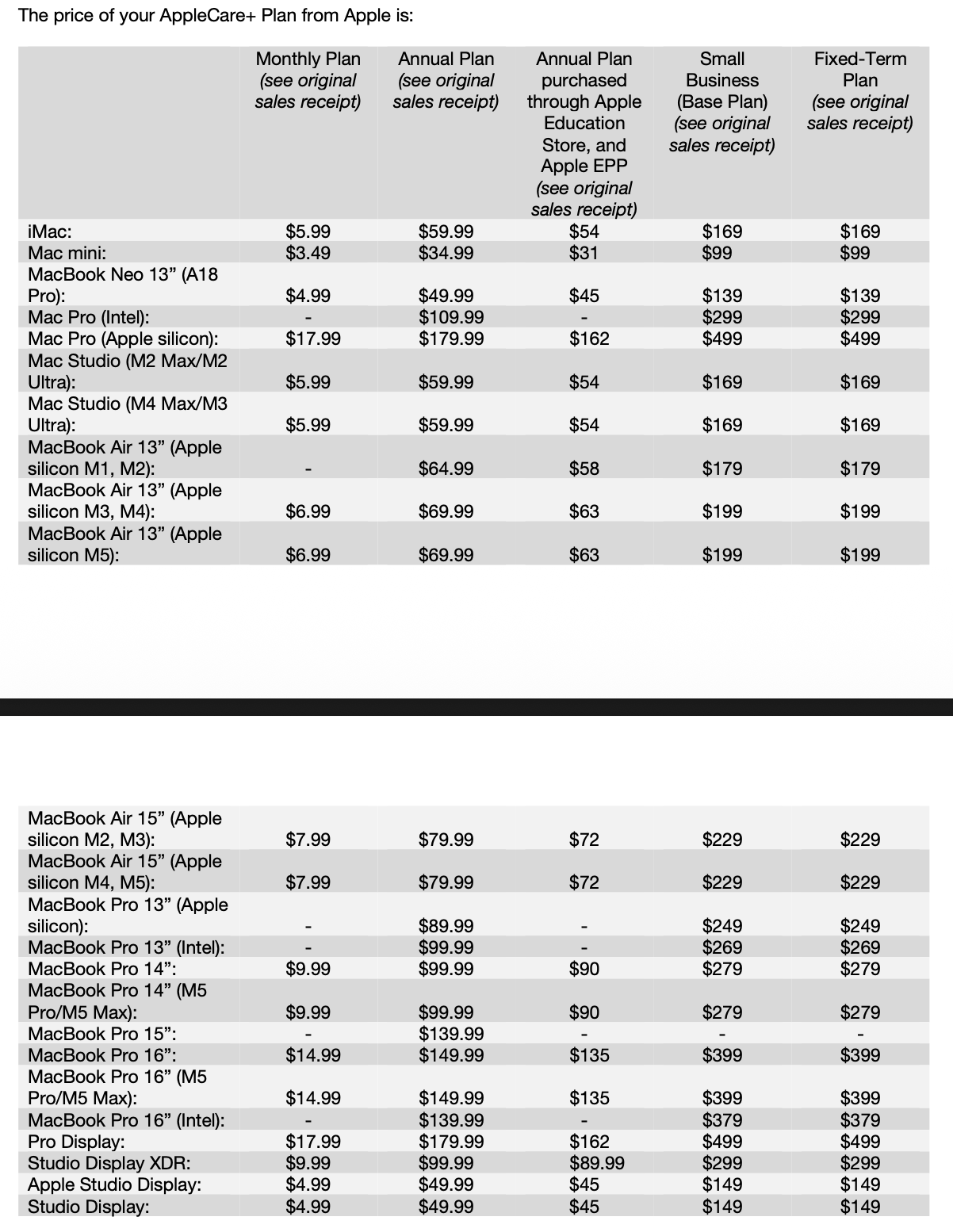
MacBook Pro 16″ M5 Pro/M5 Max), $14.99 a month, $149.99 a year or $399 for “Fixed-Term Plan” Steve, like other reps was initially convinced this was a 2-year plan because it doesn’t say any details to them other than “Fixed-Term” and Apple only sells 2-year plans for every device they make (90% of their devices sold are non-Macintosh computers).
But I pushed back on Steve and said if 1-year is $149.99, that’s $299.98 for 2 years if I chose an annual plan. Why would I pay $399 for a 2-year plan? He paused and phoned-a-friend.
After 15 minutes of silence he confirmed it would be for 3-years and asked if I wanted to purchase it. He then warned me that it may not convert to an annual plan upon expiration. He could be right….
A caveat that he rightfully called out is that if you do a $149.99 annual renewal, this plan will continue until..forever(?) until you cancel it which can be done via System Settings since it shows up as an AppleID subscription. I assume when your product goes into Vintage status, it will no longer have a warranty.
I can tell you with confidence because I experienced this myself that when the 3-year AppleCare+ Protection Plan for my M1 Max MacBook Pro was going to expire in 2024, I received a 45-day notice warning in System Settings on my Mac asking if I wanted to convert to an annual plan. I did and paid Apple $149.99 twice to continue receiving coverage for a 2021 Mac through December of 2026 and it was set to renew again for another year when I sold it.
So my hunch is because Apple is so services oriented now that, like my previous Mac, the 3-year plan will convert to annual if I want it to in 2029. We’ll see!
Here’s the relevant Math of why it’s worth it for you to call Apple and attach the 3-year plan:
| AppleCare Options for MacBook Pro 16″ | Price per term | Total Price over 3 years |
| Monthly | $14.99 a month | $539.64 |
| Annually | $149.99 a year | $449.97 |
| 3-years | $399 | $399 |
I guess one could argue that adjusted for inflation, $149.99 a year is the better deal but this is Apple we’re talking about here and who’s to say that they won’t just raise their annual plan to $165 or $175 in the 2nd or 3rd year. Paying $399 today is locking in coverage for a full 3 years.
But what if I don’t know if I’ll still have this computer in 3 years? Isn’t pre-paying wasting money?
Great point. Apple has terms that address this:

Essentially, Apple owes you a refund for any unused portion of the plan. You just have to call them up and cancel and they’ll get you a refund for however many months are remaining.
So you’re paying $11.08 a month for AppleCare+ on a 3-year term instead of $14.99 a month. This is a significant savings over 3 years, it’s locked in and you can get a refund if you sell the computer.
After 35 minutes on the phone with Steve, I received an email with a link to pay for my coverage. I put it on my AppleCard which gets me $11.97 back (3% on all Apple Purchases) and that essentially means one full month of AppleCare was free!
I made the purchase:
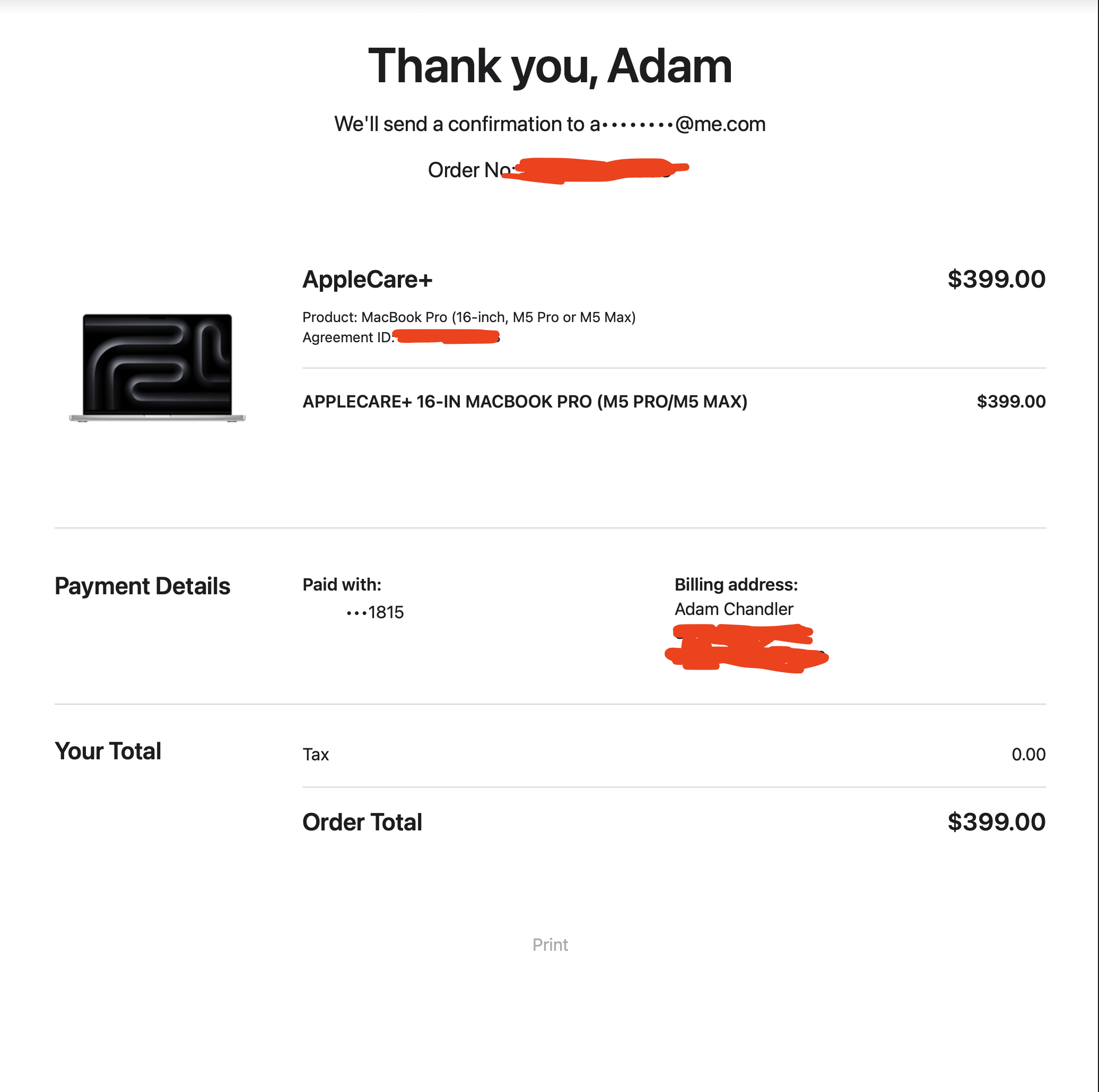
…and 5 minutes later, my System Settings updated to this:

You’ll notice on the Term Contract, it says “March 7th, 2029” since it reverts back to purchase date.
I hope this helps someone else because there’s essentially NO INFO on the Internet about attaching a 3-year AppleCare+ Plan to Macintosh computers.
Comments 1
Comments are closed.